NOTE: The following example is deprecated with the May 2010 3.25 release of Mail::IMAPClient. See Phil’s IDLE example, which uses the new idle_data() and makes life easier.
I’ve been ill recently and I haven’t had time to refine this to what I want it to be, but I’m going to put it out there since I can’t find a single example of how to do this otherwise. How exactly do you use the IDLE command that the Mail::IMAPClient implements? The short answer is a Perl socket read. The longer answer is the following short piece of code.
I by no means am expert when it comes to Perl, and I’m even less of an expert when it comes to the use of sockets. The following small example does work, though I’m sure someone can offer a much more refined version. The following script is based on the Gmail connect script at Perl Monks that was written by polettix and refined by markov. They did a nice job and I simply added to their example.
#!/usr/bin/env perl
use warnings;
use Mail::IMAPClient;
use IO::Socket::SSL;
# Connect to the IMAP server via SSL
my $socket = IO::Socket::SSL->new(
PeerAddr => 'imap.gmail.com',
PeerPort => 993,
)
or die "socket(): $@";
# Build up a client attached to the SSL socket.
# Login is automatic as usual when we provide User and Password
my $client = Mail::IMAPClient->new(
Socket => $socket,
User => 'yourusername',
Password => 'yourpass',
)
or die "new(): $@";
# Do something just to see that it's all ok
if ($client->IsAuthenticated()) {
print "Logged in.
";
# open inbox folder
$client->select("INBOX");
my $idle = $client->idle or warn "Couldn't idle: $@
";
print "IMAP now idle....waiting for email
";
while($bytes_read = $socket->sysread($buf, 4096))
{
print "Read $bytes_read bytes from the socket...
";
print "Data:
" . $buf . "
";
print "IMAP now idle....waiting for email
";
$client->done($idle) or warn "Error from done: $@
";
$client->idle or warn "Couldn't idle: $@
";
}
$client->done($idle) or warn "Error from done: $@
";
# Say bye
$client->logout();
}
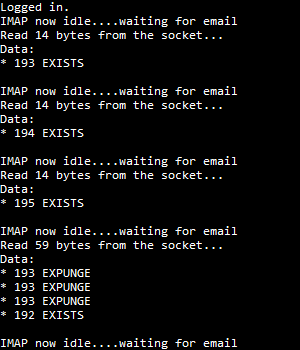
The example above requires you change out the username and password, and presumes that you’re connecting to Gmail (or in my case, Google Apps for Domain). Since Google now offers the IDLE command, the output looks something like the screenshot to the left. It’s very basic output (this was only a quick test), but the connection sits in idle and waits for the IMAP server to return data to the open socket. It’s very quick in my limited tests (there’s very little delay). I haven’t worked out all the kinks in this little test, but it gives you some idea on how to read the socket in conjunction with IDLE.
This all came about because I’ve been working with a combination of Snarl (a notification system for Windows) and it’s Perl module Win32::Snarl for alerts from various scripts. Both Snarl and the Perl module work quite well. Here’s the same script, but with Snarl support (it will display alerts through Snarl).
#!/usr/bin/env perl
use warnings;
use Mail::IMAPClient;
use IO::Socket::SSL;
use Win32::Snarl;
# Connect to the IMAP server via SSL
my $socket = IO::Socket::SSL->new(
PeerAddr => 'imap.gmail.com',
PeerPort => 993,
)
or die "socket(): $@";
# Build up a client attached to the SSL socket.
# Login is automatic as usual when we provide User and Password
my $client = Mail::IMAPClient->new(
Socket => $socket,
User => 'yourusername',
Password => 'yourpass',
)
or die "new(): $@";
# Do something just to see that it's all ok
if ($client->IsAuthenticated()) {
my $winAuth = Win32::Snarl::ShowMessage('Gmail Authenticated', 'You are now logged into Gmail.', 5);
print "Logged in.
";
# open inbox folder
$client->select("INBOX");
my $idle = $client->idle or warn "Couldn't idle: $@
";
print "IMAP now idle....waiting for email
";
while($bytes_read = $socket->sysread($buf, 4096))
{
print "Read $bytes_read bytes from the socket...
";
print "Data:
" . $buf . "
";
print "IMAP now idle....waiting for email
";
my $winNM = Win32::Snarl::ShowMessage('New Email', $buf, 5);
$client->done($idle) or warn "Error from done: $@
";
$client->idle or warn "Couldn't idle: $@
";
}
$client->done($idle) or warn "Error from done: $@
";
# Say bye
$client->logout();
}
Your mileage may vary with the examples above; they’re brief to say the least. My goal is to write a very light Gmail check script, along with adding Snarl notifications to some of my other perl scripts. At least when I’m feeling better.